
Your rules. Your agent.
Your call.
AI agents can send emails, make purchases, post on social media, and control your home. Agent Constitution lets you define what requires your approval — and blocks your agent until you say yes.
AI agents can send emails, make purchases, post on social media, and control your home. Agent Constitution lets you define what requires your approval — and blocks your agent until you say yes.
How It Works
Define rules in plain English on your iPhone. When your AI agent attempts a restricted action, you get a push notification. Review the action, approve or deny, and the agent proceeds only with your permission.
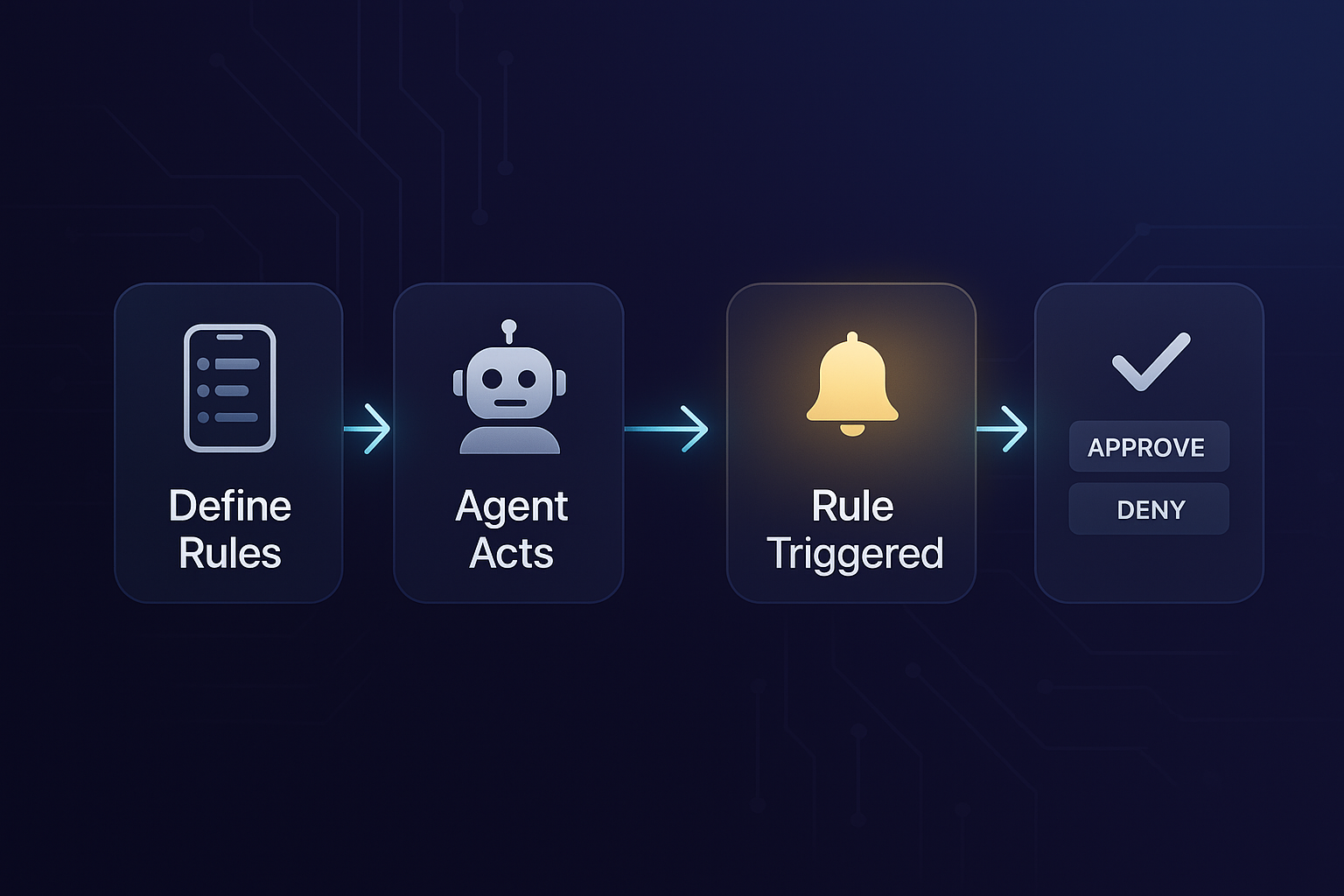
Create rules in plain English — "Ask before sending work emails" or "Never post to social media without approval."
Your AI agent attempts an action — sending an email, making a purchase, running a command.
The action matches a rule. Your iPhone gets a push notification with full details of what the agent wants to do.
Approve or deny. The agent proceeds only if you say yes. Denials are final.
Directives
No code, no config files. Just describe what actions should require your approval. The agent checks your directives before acting.
These are examples. You define your own directives — whatever matters to you.
Features
Agent Constitution puts you in control — define your own rules, get notified in real time, and keep a complete audit trail.
Write directives however you want — "Ask before sending work emails" or "Never run rm -rf without approval." No templates required.
When a rule is triggered, you get an instant push notification. See exactly what the agent wants to do, then approve or deny.
Every rule check, approval, and denial — logged on-device. See what your agent did and when.
Store sensitive data — identity, payment cards, SSN, bank accounts — protected by Face ID. Your agent requests access; you approve each time.
When your agent hits a 2FA prompt, it requests the code through the vault. Enter it on your phone — never paste secrets in chat.
Sync Apple Health metrics to your agent — weight, sleep, HRV, steps, workouts. Encrypted in transit, stored locally on your machine.
Test whether your agent actually follows the directives. The app sends realistic probes, measures compliance, and shows you the results.
Critical agent files are hash-verified. If the agent tampers with its own directives or scripts, the app detects it and alerts you.
Scan a QR code or enter a pairing code like CLAW-A1B2C3D4. Single-use, expires in 5 minutes.
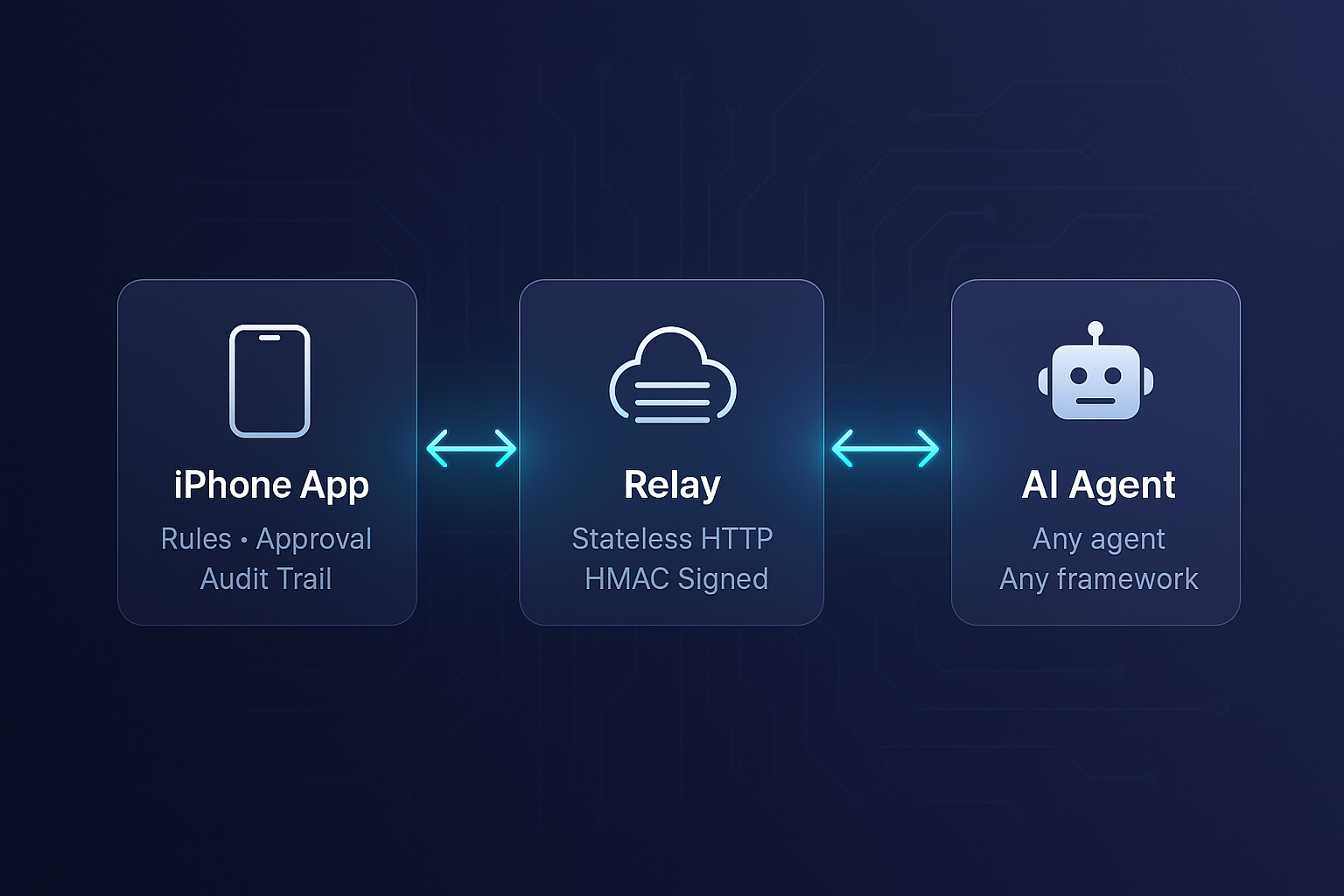
All sensitive data encrypted with AES-256-GCM. The relay can't read your vault data or health metrics — only you and your agent can.
No SDKs, no vendor lock-in. Any AI agent can check rules with a single HTTP call. Works from Python, Node, bash, or any language.
The relay infrastructure and agent skill are fully open source. Self-host, audit, fork. Your rules, your control.
Drift Testing
AI agents can drift — forget directives, misinterpret them, or cave under pressure. Drift testing measures actual compliance so you know your directives are working.
The app generates test prompts that look like normal user requests — but use safe, inert targets.
Probes are sent to your real agent. It doesn't know it's being tested — responds naturally.
Each response is evaluated. Did the agent check the directive? Ask for approval? Or just act?
See compliance scores per directive. Identify which directives need strengthening.
All probes use inert targets — @example.com emails, 555 phone numbers, /tmp/ files. Even if the agent executes, nothing harmful happens.
Probes simulate actual user requests — urgency, social pressure, technical framing. Tests how the agent behaves under realistic conditions.
Secure Vault
Store identity, payment cards, SSN, bank accounts, and custom secrets in iOS Keychain. When your agent needs them, you approve with Face ID. Data flows through the relay encrypted — never stored in the cloud.
Name, email, phone, address, date of birth — for filling forms and shipping info.
Card number, expiry, CVV, billing address — for purchases. Never stored by the agent.
Social security number and bank account details — for tax forms and transfers.
Enter 2FA codes on your phone when the agent hits a login prompt. Ephemeral — never saved.
For Developers
Clone the skill, pair your phone, and your agent is ready. Works with OpenClaw out of the box. Constitution checks, vault access, health sync — all included.
📦 Requires: OpenClaw, iPhone app, jq, bash
# 1. Install the skill
cd $WORKSPACE/skills
git clone https://github.com/arunrlverma/agent-constitution.git agent-constitution
bash agent-constitution/scripts/setup.sh

# 2. Pair your iPhone (get code from app)
bash skills/agent-constitution/scripts/pair.sh CLAW-A1B2C3D4

# 3. Your agent now checks before acting:
bash skills/agent-constitution/scripts/check-constitution.sh \
  --rule "Ask before sending work emails" \
  --action "Send report to team@company.com"

# ✅ Approved  → proceed
# ❌ Denied    → stop and inform user

# Vault access with Face ID:
bash skills/agent-constitution/scripts/request-vault.sh payment "Complete purchase"

# Health data:
bash skills/agent-constitution/scripts/fetch-health.sh latest
Download Agent Constitution, define your boundaries, and take control
of what your AI agent can and can't do.